
Try Govard Without a Project
govard tryThat is the whole setup. The command creates a temporary Mage-OS project in a directory of its own, starts the full default stack, installs sample data, prints the storefront and admin URLs, and removes everything when you exit. Your current directory is never touched, and no Magento credentials are needed.
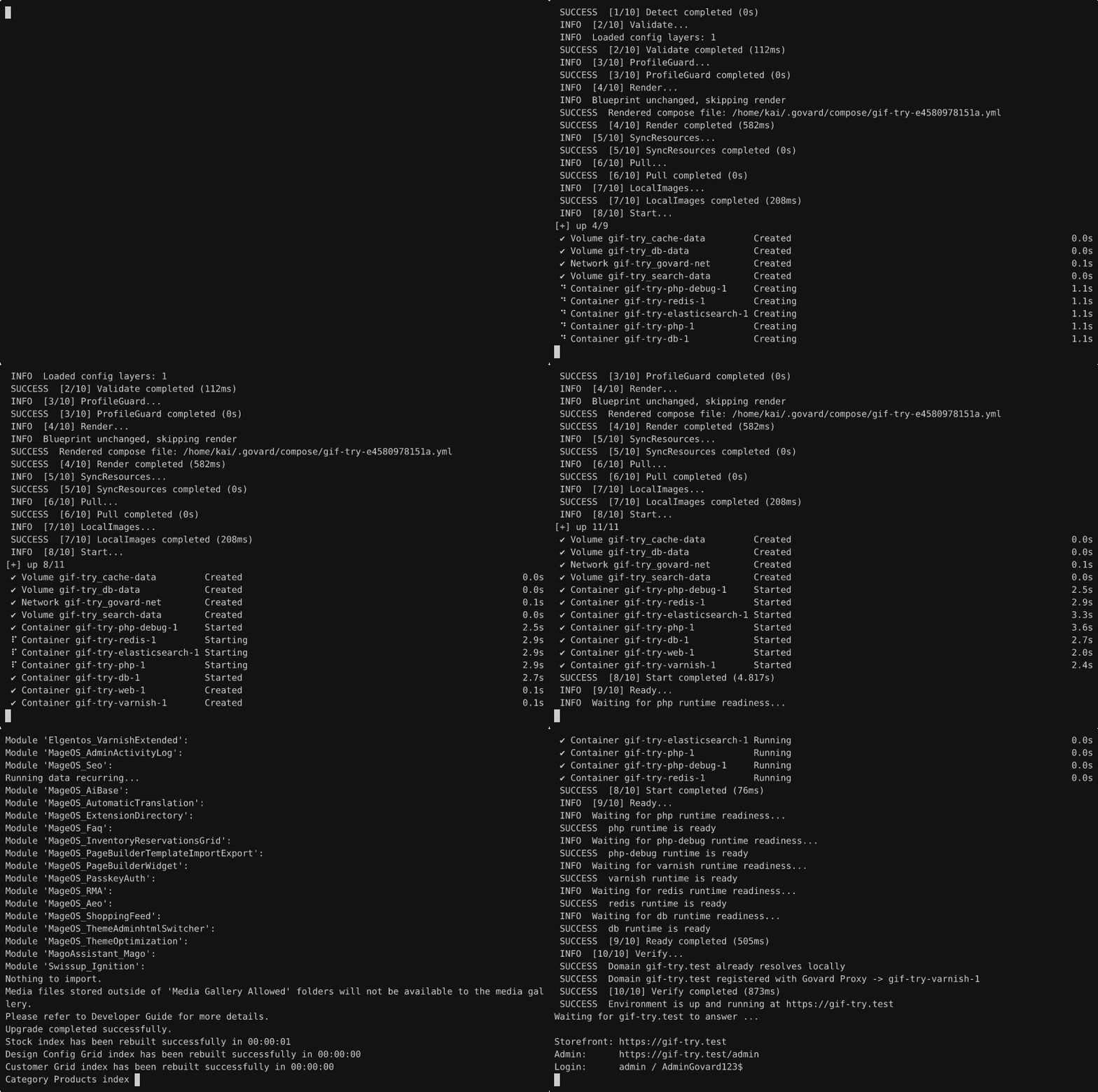
Recorded on 2026-11-04 with asciinema on the machine this project is built on. The recording is real and uncut except for the dependency install in the middle, marked ... 7 minutes of dependency install and Magento setup ...; idle time is capped at one second. The full run took 7 minutes 45 seconds.

The storefront that run produced, captured in a browser: the CMS slider, the promo blocks and the Hot Sellers grid, all styled from static/. Reproduce the capture with:
google-chrome --headless=new --window-size=1200,1920 \
  --virtual-time-budget=20000 --screenshot=storefront.png https://<trial-domain>/
Give the page the time budget, or the slider has not initialised when the screenshot is taken.
What the run does
- Creates a trial workspace and writes a
.govard.ymlfor Mage-OS. - Starts the default stack: nginx, PHP-FPM, MariaDB, Redis, OpenSearch and Varnish, plus the debug PHP container the project always carries.
- Installs Magento with sample data, then sets the storefront base URLs.
- Registers the domain with the Govard proxy and waits for the storefront to answer with a certificate the local CA signed.
- Prints the URLs and the admin login, waits for you, and removes the workspace unless you asked to keep it.
What it costs
Measured on a workstation with warm images, 2026-11-04:
| Value | |
|---|---|
| Bootstrap to a serving storefront | 8 minutes 6 seconds |
| Disk for the trial workspace | 1.1 GB |
| Ports | 80 and 443, through the Govard proxy |
| Storefront latency after the first visit | tens of milliseconds, the Varnish hit measured on the benchmark page |
The first run also pulls the container images, so expect longer. Every later run reuses them.
Flags
| Flag | What it changes |
|---|---|
--keep | Keep the workspace when the trial ends and print the path, so you can start it again later |
--no-sample | Skip the sample data install, which is most of the eight minutes |
--dir <path> | Use this directory as the trial workspace instead of a generated one |
--setup | Run the one-time privileged setup first: proxy, local CA, and the hosts entry |
--timeout <duration> | How long to wait for the storefront to answer, 20 minutes by default |
--no-open | Do not open the storefront in a browser |
Requirements
- Docker running on the host.
- Ports 80 and 443 free. The Govard proxy owns them and serves every project, so stop anything else that binds them.
- The local CA trusted and the domain resolvable, which
govard try --setupprovides in one privileged run. Without them the command stops before downloading anything and names the missing piece.
When it fails
- Port 80 or 443 is taken. The command says the proxy could not start; stop the other listener, or check
govard proxy status. - The storefront never answers. The command prints the bootstrap log tail and keeps the workspace, so the containers can be inspected with
govard env upfrom that directory. - The certificate is not trusted. Run
govard try --setuponce; it installs the CA and the hosts entry.
After the trial
Without --keep the workspace and its containers are removed. With --keep the path is printed; cd there and use govard env up and govard env down like any other project, or delete the directory to be rid of it.
If the trial is worth keeping, create a project properly instead:
govard init          # detect the framework, write .govard.yml
govard env up        # start it
Re-recording the demo
The recording above was made with asciinema and agg:
asciinema rec run.cast --idle-time-limit 1 --cols 100 --rows 28 \
  --command "govard try --keep --no-open"
agg --speed 2 --font-size 14 --theme asciinema --cols 100 --rows 28 \
  run.cast try-demo.gif
The cast file is the source of truth: keep it with the recording so a reader can replay the exact run.